Using platemaps to analyze and share data
Abstract
How do you join descriptions of experimental variables and measurement data together to analyze and share data in a reliable way? In this note, we’ll discuss a common format for sharing datasets and introduce the platemap, a table that represents metadata for wells in a multiwell plate, as a tool for building these datasets. We’ll show you how to build a platemap and how to use it for your analysis.
Parable of the data
Consider this common scenario: you’ve collected some data from an experiment, and you want to analyze it. First, you have to associate each measurement with its corresponding experimental variables . Maybe you store the resulting dataset in a spreadsheet. Or, maybe you load a data file from an instrument into a Jupyter notebook and you save the condition information in a separate variable.
Now, suppose you want to compare these data to some you collected previously, or maybe to data collected on a different instrument, or from a collaborator. To do that, you’ll need to compare experimental conditions. The different datasets are all stored in files with different formats. In order to join them all together, you end up making a specialized workflow for each separate dataset. Only after tedious data wrangling are you ready to start doing actual analysis.
We can make our lives a little easier if we use common standards to format our data. With predictable structure, it becomes much easier to handle datasets from different experiments and groups. In this note, we’ll introduce the platemap for annotating multiwell plate data, and show you how you can use it to build shareable datasets and improve your analysis workflow.
Representing experimental data
In an experiment, we try to understand how input variables are transformed into output variables. The output variables are all the measurements we take of our samples. The input variables are made up of: (1) every independent variable that we directly manipulate in the experiment, and (2) any additional experimental and process variables that we don’t directly control but might still affect the output variables.
A simple way to represent such an experiment is with a table where each row represents all the inputs and outputs. In a common convention known as the “long” format, each row contains one output measurement and the corresponding set of input variables for that sample (Figure 1). For experiments with multiple measurements per sample (e.g., reads at multiple wavelengths, or timeseries with multiple time points), there is one row for each of these measurements, all with identical values in the input columns.
Learn more about “long” vs “wide” data formats.
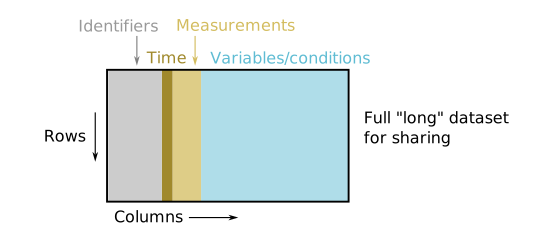
Figure 1:Datasets can be shared easily as tables in the “long” data format. Each row corresponds to a single measurement. It contains identifying information like the experiment and the well coordinate, the measurement value and time, associated metadata (such as read type), and the corresponding experimental variables and input conditions.
Platemaps link experimental inputs and outputs
However, the instruments that record data from an experiment typically don’t include all of your experimental inputs in their output files, just a smaller subset of identifiers (e.g. Well, such as “A1”). To make the full dataset, we need to associate the full set of experimental inputs with the measurement outputs. We also want to ensure that the data from any given experiment can be compared to data from another without confusion (i.e., wells on different plates are different samples!). To do this, we can make a smaller table that maps the identifier labels from the instrument to a set of corresponding experimental conditions and metadata that disambiguate measurements across experiments. Since many biological experiments are conducted using multiwell plates, we call this smaller table a platemap.
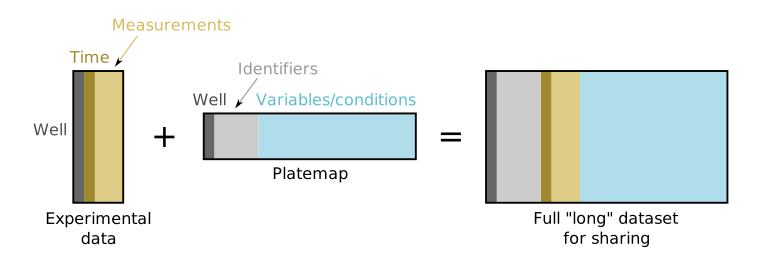
Figure 2:A platemap links measurements to the full set of experimental input variables and conditions associated with those measurements. It contains information that should uniquely identify each measurement, even across experiments, and describe the experimental input variables for that measurement. For an experiment run on a single plate, a full “long” format dataset can be generated by merging the platemap with a table of measurements on a Well identifier.
How to make a platemap
In brief, a platemap tells you the geography of your experiment: what’s in your plate and where it is.[1] Each row represents one well of the plate, and each column describes a different aspect of the content in that well (e.g., DNA concentration).
A properly formatted platemap has five (5) required columns that uniquely describe each well: Well, Date, Experiment, Name and Type. It may have as many optional columns as you’d like to provide additional information about each experimental condition.
Below, we’ll show you an example of a plate and a corresponding platemap, then go into more detail about the platemap columns.
The relative ordering of rows and columns is not important.
For ease of use, platemaps should be saved in a common table format like a
*.csv(comma-separated) or*.tsv(tab-separated) file.A simple visual way[2] to make a platemap is in a spreadsheet editor, like Google Sheets, Microsoft Excel or Numbers for Mac, and exporting the file as a
*.csvor*.tsv.
Here is a simple example for a small plate with 6 wells:
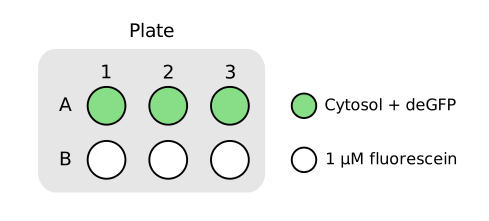
| Well | Date | Experiment | Name | Type | [Standard] (nM) | Reporter | Volume (µL) |
|---|---|---|---|---|---|---|---|
| A1 | 2026-04-08 | platemap-example | Cytosol + deGFP | Sample | deGFP | 10 | |
| A2 | 2026-04-08 | platemap-example | Cytosol + deGFP | Sample | deGFP | 10 | |
| A3 | 2026-04-08 | platemap-example | Cytosol + plamGFP | Sample | plamGFP | 10 | |
| B1 | 2026-04-08 | platemap-example | 1 µM fluorescein | Standard | 1000 | 10 | |
| B2 | 2026-04-08 | platemap-example | 1 µM fluorescein | Standard | 1000 | 10 | |
| B3 | 2026-04-08 | platemap-example | 1 µM fluorescein | Standard | 1000 | 10 |
Required columns
Four of the required columns serve to uniquely identify the contents of each well across experiments in a dataset:
Well: the alphanumeric coordinate of the well (e.g., A1, B2)Date: the date the experiment was conducted
Experiment: a name briefly describing the experimentName: a brief description of the contents of the well
For performing statistics, it’s useful to have all replicates have identical Name values.
The fifth required column, Type, is not an identifier but indicates the role of this well in this experiment. Type should be one of
SampleStandardBlankControl,Positive ControlorNegative Control
Type indicates what kinds of analyses are relevant to each well within our CDK.
Optional columns
A platemap may also have any number of additional, optional columns that provide useful metadata about the contents of the wells. These should indicate the experimental variables that you have direct control over (e.g., DNA concentration) as well others you think may influence the experiment’s outcome (e.g., identity or lot number of your DNA template, reaction volume, experimentalist, etc.). You may include other columns to facilitate analyzing your final dataset, such as which fluorophore/reporter type is used in each measurement. See Using optional platemap columns for analysis below for an example.
Using platemaps
Once your platemap has been made, it can support the analysis and sharing of your experimental data. In this section, we’ll see some example applications.
Associating experimental conditions with measurements
When using an instrument like a plate reader to make fluorescence measurements, the resulting data files are instrument-specific and typically don’t allow you to include many kinds of information needed to analyze your data or to make your data legible to collaborators. Typically you’ll just have the measurement information and the wells on the plate they correspond to.
To format your data, first read your instrument data into a table with one row per measurement. You can then “join” or “merge” your table with the platemap, using the Well column to match input variables to output measurements (visualized in Figure 2 above). In Python, if your data are loaded into a Pandas DataFrame called data, this can be done in a fairly straightforward way:
import pandas as pd
platemap = pd.read_csv('path/to/platemap.csv')
data = data.merge(
    platemap, how='left',
    left_on = '<Well column in data>', #rename to your "Well" column in instrument data
    right_on = 'Well' # corresponding "Well" column in your platemap
)
Now your data object can be analyzed using tools designed for other long-format datasets, and can be easily concatenated (e.g., with pd.concat()) with other datasets for joint analysis.
This is implemented in the CDK directly for BioTek instruments in the function that loads plate reader data:
from cdk.analysis.cytosol import platereader as pr

data, platemap = pr.load_platereader_data(
    data_file='path/to/datafile.txt',
    platemap_file='path/to/platemap.csv',
    platereader="biotek-cdk"
)
The resulting data object is a Pandas DataFrame that contains the dataset in full “long” format, suitable for sharing or further analysis.
Using optional platemap columns for analysis
By including information about experimental conditions into the platemap, we can easily filter data based on different experimental variables to understand how each affects the results. Labels about measurement conditions, like different modalities or read types, can be used the same way.
As a simple example, when visualizing data using Seaborn, a column can be used as a facet when plotting data:
sns.relplot(data, x = 'Time', y = 'data_normalized',
            hue = 'tRNA ID')
Applying this to sample data (Figure 4), we have a hint of a batch effect from different lots of tRNA.
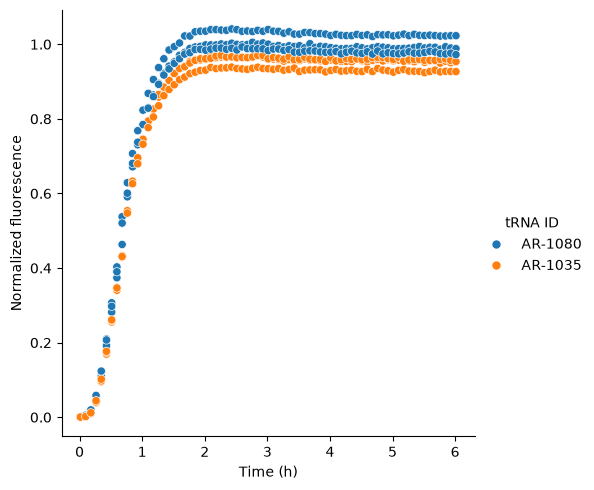
Figure 4:Using an optional platemap column to visualize differences due to experimental conditions. Here, the time course of (normalized) fluorescence of GFP produced in a PURE reaction is shown for two different tRNA stocks (colors). This plot was generated by faceting on the tRNA ID column that was included in the platemap.
- CDK
- cell development kit